
Building any sufficiently big software, you will eventually encounter large amounts of data.
Whether a thousand papercuts of seed files or gigabytes of machine learning assets — you’re faced with a decision on where they should live and how to manage them.
What do you even want from your setup?
Well, you probably want it to be stupid simple, and in this case with files, I say, “simple” means as homogenous as possible.
It’s convenient to treat a GB-sized monstrosity similar to a 2-KB source code file, not having to sink in the morass of updating and versioning an external storage system, juggling scripts for download/upload.
Tip. A lot of software engineering is realizing that your direct problem is a subset of a bigger problem and going for the broader solution when possible.
While great for engineering processes, homogenity applies not as well to humans.
For human individuality matters.
git offers a terrific approach to managing source code, and many of us are already familiar with it. No reason its model can’t be extended onto the large stuff, piggybacking on the good ol’ push/pull, branches, etc.
Now, of course, adding and committing large files directly is impractical. With every committed change, old versions of files remain in history, blowing our repo size out the window quickly.
Git LFS is the first thing you see when looking for a solution. Instead of storing actual file blobs, you store a small pointer string to the file, while the actual contents live on the LFS server. On their way in and out of git, LFS-marked files will automatically be downloaded/uploaded.
However, using it in practice turns out wacky.
LFS requires a centralized server, usually tying you to a git hosting provider. GitHub imposes a free tier bandwidth limit of 10GB/month, evaporating quickly for anything substantial.
You could self-host Git + LFS in a bare repo on a VM and use SSH, removing the bandwidth limit. Though, you may soon find out that some VM providers limit outgoing traffic, resulting in unbearably slow download speeds on pull.
Observation. The will to doubt and go beyond the obvious answer is how the magic of discovery happens. You must have the irrational belief that out there somewhere something better exists.
I anticipate this becoming increasingly rare and valuable, as temptation of Prompt -> Accept recommended solution becomes harder to resist.
Now to the actual solution to our problem:
This software introduces the concept of “special remotes” for blob storage that underneath can be anything: an S3-compatible service, plain folder on another machine, a torrent, or even your USB drive.
Unlike LFS, Annex follows the distributed nature of git, allowing for multiple special remotes and each individual repo clone being able to act as a remote if desired.
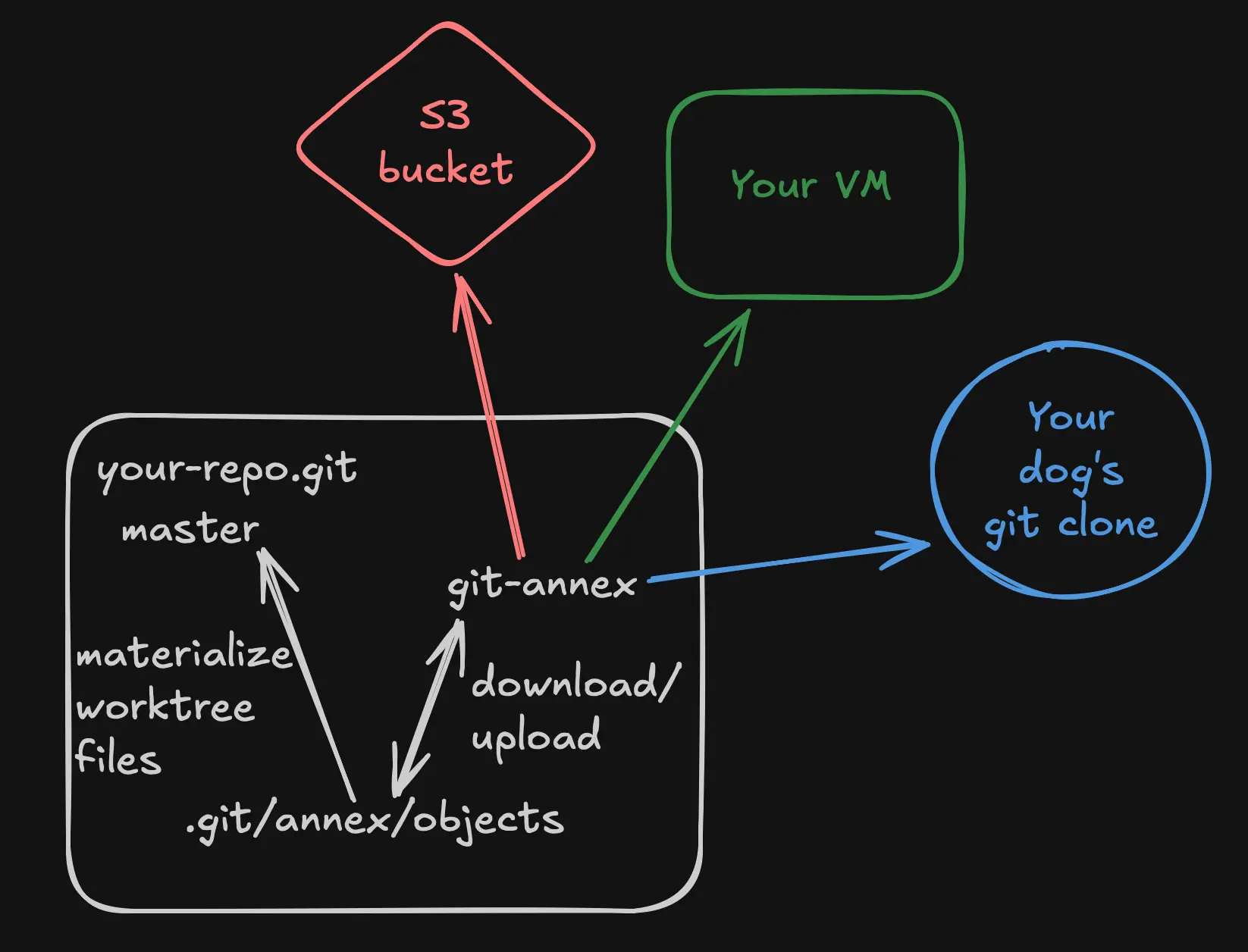
Let’s break down what happens with annexed files:
The “store-pointer-instead-of-file” approach is similar to LFS.
We create a .gitattributes file in our repo and inside it say:
some/path/** annex.largefiles=anything
Now automatically git content filters will come into play:
- Clean — upon
git addaffectingsome/path/**a hash will be computed and replace the actual file contents inside git tracking. e.g./annex/objects/SHA256E-s5242873--26f6903e935d4eff5d8f6857a7cbf6f43f3b6f2fd4a69b5e798e5b5d0e8c58cd.bin - Smudge — upon
git checkoutfor anything insidesome/path/**we look at the hashes tracked in git and try to recover the actual files from.git/annex/objectsfolder and put them at the expected paths.
Annex creates and automatically updates a separate branch called git-annex for tracking remote locations of where the assets live.
You would use these 2 commands whenever your current work wants to read/mutate annexed files:
git annex pull --content— pullsgit-annexbranch and downloads remote files the current branch is pointing to, populating.git/annex/objects. Use it when you clone the repo, checkout a branch, and in general when you want to make sure your annexed files are fresh.git annex push --content— updatesgit-annexbranch and uploads files to the remote. Use it when you’ve mutated annexed files and are ready to push your work.
A bit annoying that you have to think about using different push / pull commands at all, it’d be magical for everything to work with git pull / git push muscle memory, achieving true homogenous treatment.
You could try and use aliases for that:
git config alias.pull '!git annex pull --content'
git config alias.push '!git annex push --content'
However, I prefer putting up with the slight indirection layer.
It’s a good balance of:
- simplicity of 2 semi-familiar commands
- awareness of “huh, big files are involved here, maybe i should pay attention”
- a gentle on-ramp to learning more about
git-annexif you desire, nudging your curiosity to go learn a bit more about distributed systems
Good tech pokes out just enough from behind the curtain for you to grab and master it when you need it.

Big thanks to Joey Hess for bringing this technology into the world and Matteo Bernardini for introducing me to it!
Below is a dumb and boring walkthrough of a git-annex setup using Cloudflare R2 bucket as a remote.
git-annex with Cloudflare R2 remote
Cloudflare R2 is an S3-like storage that offers good speed thanks to the CDN and no egress bandwidth costs.
You can also enable public read access, exposing your bucket through a domain you own, which could be useful for open-source projects, not having to worry about contributors eating your GitHub LFS limits.
Pre-requisites
- Cloudflare account + a domain you can manipulate through Cloudflare
- Create an R2 bucket named
<YOUR_R2_BUCKET_NAME> - Create R2 API token with these options
Object Read & WritepermissionsApply to specific buckets only-<YOUR_R2_BUCKET_NAME>- Copy
Access Key IDandSecret Access Keyand store them for later usage
- Attach a custom domain to your bucket
<DOMAIN_YOU_ASSIGNED_TO_BUCKET>- necessary for public read access
Follow these steps:
# Install git-annex on your device using preferred package manager
brew install git-annex

# Init the repo and git-annex
mkdir annex-example && cd annex-example
git init
git annex init

# disable symlinks for annexed files
# makes working with them more natural
# and avoids errors from other software not expecting symlinks at paths
git annex config --set annex.addunlocked true

# make anything in seed/ folder automatically tracked by annex
mkdir seed
printf '%s\n' \
  'seed/** annex.largefiles=anything' >> .gitattributes

# generate random 5MB blobs for demonstration purposes
for i in 1 2 3 4 5 6; do
  dd if=/dev/urandom of=seed/example$i.bin bs=1048576 count=5 2>/dev/null
done

# stage and commit our seed
git add -A
git commit -m "init"

# env credentials required for R2 write access. read is public thanks to our domain setup
export AWS_ACCESS_KEY_ID=<YOUR_R2_ACCESS_KEY_ID>
export AWS_SECRET_ACCESS_KEY=<YOUR_R2_SECRET_ACCESS_KEY>

# setup R2 remote, make sure to edit all the placeholders
git annex initremote r2 type=S3 \
    host=<YOUR_CLOUDFLARE_ACCOUNT_ID>.r2.cloudflarestorage.com \
    bucket=<YOUR_R2_BUCKET_NAME> protocol=https \
    signature=v4 encryption=none autoenable=true \
    requeststyle=path region=auto \
    publicurl=https://<DOMAIN_YOU_ASSIGNED_TO_BUCKET>

# verify annex is able to upload seed files to R2
git annex copy --to r2
Congrats! With this the basic setup is done.
Now I suggest adding a remote like GitHub/Codeberg, pushing your code and practicing common operations.
When working with files not related to “git annex” - it’s ok to use the regular git pull / git push workflow.
Now for common scenarios involving annexed files:
- Fresh repo clone with downloading all annexed assets on main branch:
git clone ...

# -J == --jobs, manages download concurrency
git annex pull --content -J8
- Checking out a branch, updating annexed assets to match the branch:
git checkout ...
git annex pull --content -J8
- Adding/Modifying annexed assets at a path mentioned in
.gitattributesand pushing:
git add -A
git commit -m "added/modified annexed assets"

# pushes the current and git-annex branches, uploads assets to remote
# `sync` differs from `push` in that it first performs `annex pull` and then `annex push`
git annex sync --content -J8
- Deleting annexed assets:
# Delete them as you normally would
rm ...
# Clean up orphaned assets once in final stages of work
git annex dropunused --from r2 all
To avoid constantly passing --content flag to git annex push/pull/sync commands you could set git config annex.synccontent true - this controls whether pull/push/sync also try to download/upload actual files besides just updating the git-annex branch.